Showing posts with label SQL Database Management. Show all posts

SQL Database Management Part 12

1.Practice

留言板
功能:
1.需要會員登入:(不登入只能瀏覽)、(登入才可以留言)
2.有回留言功能
3.可刪除自己的留言
4.管理者可以刪除所有留言


所需要的資料表以及其欄位:
會員帳號:
流水號
帳號
密碼
Email

留言:
流水號
貼文者
貼文時間
貼文標題
貼文內容

回覆留言:
流水號
留言編號
貼文者
貼文時間
貼文標題
貼文內容


公司網站
所需要的資料表以及其欄位:

最新消息
(資料表)最新消息內容
流水號
日期
標題
內容
貼文者

公司簡介
(資料表)靜態文章
流水號
最後修改日期
標題
內容
最後修改人

產品介紹 (需分類)
(資料表)產品類別
流水號
類別名稱

(資料表)產品內容
流水號
產品類別
產品名稱
簡介

與我聯絡
(資料表)聯絡歷史
流水號
姓名
電話
Email
內容

(資料表)管理者帳號
流水號
帳號
密碼
姓名


購物車網站

所需要的資料表以及其欄位:
會員註冊、登入
可以購買商品、有購物車機制

會員資料表

管理員資料表

廠商資料表

商品分類

商品細項

訂單

訂單細目

SQL Database Management Part 11

1.Create constraints / 建立條件約束

就是限制該欄位可以儲存的值得條件,例如限制 gender 欄位只可輸入'M' 或 'N',其他值不允許。
範例:
先建立二個新欄位,gender & age

建立條件約束

限制 gender 欄位

限制 age 欄位


2. select... into... from... 來快速複製/建立 資料表
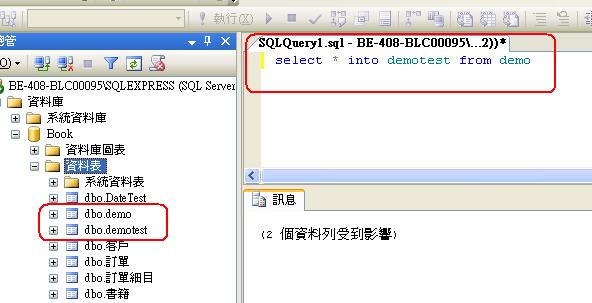
範例:將 demo 資料表複製一份 為 demotest 資料表
select * into demotest from demo


3.暫存資料表 VS 檢視表
暫存資料表:會暫時將所得到的資料暫時儲存在硬碟,等到該連線結束,就會刪除該暫存資料表。適合在在短時間內多次使用。
檢視表:不儲存資料,僅儲存語法。每次使用時都會執行該檢視表的語法一次,如果有較多的查詢與運算在該檢視表內,在短時間內多次使用就會消耗較多的資源。

PS:其實上述二者執行第一次的成本都是一樣多的。在同一連結未中斷前,執行二次以上,暫存資料表會較省資源。


建立檢視表語法:

SELECT     dbo.客戶.客戶名稱, SUM(T.小計) AS 客戶總額
FROM         dbo.客戶 INNER JOIN
                          (SELECT     dbo.訂單.客戶編號, dbo.訂單細目.數量 * dbo.書籍.單價 AS 小計
                            FROM          dbo.客戶 AS 客戶_1 INNER JOIN
                                                   dbo.訂單 ON 客戶_1.客戶編號 = dbo.訂單.客戶編號 INNER JOIN
                                                   dbo.訂單細目 ON dbo.訂單.訂單序號 = dbo.訂單細目.訂單序號 INNER JOIN
                                                   dbo.書籍 ON dbo.訂單細目.書籍編號 = dbo.書籍.書籍編號
                            GROUP BY dbo.訂單.客戶編號, dbo.訂單細目.數量 * dbo.書籍.單價) AS T ON dbo.客戶.客戶編號 = T.客戶編號
GROUP BY dbo.客戶.客戶名稱


建立暫存資料表語法:(使用 # 加上資料表名稱)

Select * Into #tmp客戶總額表 From (
SELECT     dbo.客戶.客戶名稱, SUM(T.小計) AS 客戶總額
FROM         dbo.客戶 INNER JOIN
                          (SELECT     dbo.訂單.客戶編號, dbo.訂單細目.數量 * dbo.書籍.單價 AS 小計
                            FROM          dbo.客戶 AS 客戶_1 INNER JOIN
                                                   dbo.訂單 ON 客戶_1.客戶編號 = dbo.訂單.客戶編號 INNER JOIN
                                                   dbo.訂單細目 ON dbo.訂單.訂單序號 = dbo.訂單細目.訂單序號 INNER JOIN
                                                   dbo.書籍 ON dbo.訂單細目.書籍編號 = dbo.書籍.書籍編號
                            GROUP BY dbo.訂單.客戶編號, dbo.訂單細目.數量 * dbo.書籍.單價) AS T ON dbo.客戶.客戶編號 = T.客戶編號
GROUP BY dbo.客戶.客戶名稱) T;


4.第15章
a.動態統計
1.數量累加
第一步:
Select b1.訂單序號, b1.數量, b2.訂單序號, b2.數量
From 書籍訂單 b1, 書籍訂單 b2
Where b1.訂單序號 >= b2.訂單序號
Order By b1.訂單序號


累加結果:
Select b1.訂單序號, b1.數量, SUM(b2.數量) 
From 書籍訂單 b1, 書籍訂單 b2
Where b1.訂單序號 >= b2.訂單序號
Group By b1.訂單序號, b1.數量
order By b1.訂單序號


2.移動平均
第一步:
Select b1.訂單序號, b1.數量, b2.訂單序號, b2.數量
From 書籍訂單 b1, 書籍訂單 b2
Where b1.訂單序號 >= 5
And b1.訂單序號 between b2.訂單序號 and b2.訂單序號 + 4
Order By b1.訂單序號

說明:用下面的表解釋,希望可以幫助大家更容易了解
根據 where 以及 and  的條件,b1.訂單序號 要介於 b2.訂單序號 和 b2.訂單序號 + 4 之間。
這裡用數學計算式子來看,假設 b1.訂單序號 = X,b2.訂單序號 = n,上面的條件式就變成    n <= X <= n + 4

左邊的表是當 b1.訂單序號 = 5 時,b2.訂單序號 有可能是 1至 36 (因為該資料表共有36筆資料)。所以
b2.訂單序號 = 1 、 b2.訂單序號 + 4  = 5    ----->    1 <= 5 <= 5
b2.訂單序號 = 2 、 b2.訂單序號 + 4  = 6   ----->    2 <= 5 <= 6
b2.訂單序號 = 3 、 b2.訂單序號 + 4  = 7   ----->    3 <= 5 <= 7
b2.訂單序號 = 4 、 b2.訂單序號 + 4  = 8   ----->    4 <= 5 <= 8
b2.訂單序號 = 5 、 b2.訂單序號 + 4  = 9   ----->    5 <= 5 <= 9
b2.訂單序號 = 6 、 b2.訂單序號 + 4  = 10   ----->    6 <= 5 <= 10 (不成立)
.....                         、  ........

但是只有當 b2.訂單序號 ( n ) 介於 1 至 5 時,條件才會成立。
同理,當 X = 6 時,n 等於 1 時,n + 4 = 5, ----->    1 <= 6 <= 5 (不成立)
所以 n 會是介於 2 至 6 之間。


另一個例子是相反的:
把 between b2.訂單序號 and b2.訂單序號 + 4
改成  between b2.訂單序號 - 4 and b2.訂單序號
如此 "移動窗格" ( b2.訂單序號) 就會變成 5 至 9,而不是原本的 1 至 5 了。


結果:
Select b1.訂單序號, Avg(b2.數量)  as 前後5張訂單之平均數量
From 書籍訂單 b1, 書籍訂單 b2
Where b1.訂單序號 >= 5
And b1.訂單序號 between b2.訂單序號 and b2.訂單序號 + 4
Group by b1.訂單序號
Order By b1.訂單序號


3.排名
第一步語法:將 "書籍訂單 b2" count 出來共有36個,所以顯示出36。
select COUNT(數量) from 書籍訂單 b2

第二步語法:將 "書籍訂單 b1" select 出來共有36筆
select 訂單序號,數量 from dbo.書籍訂單 b1


結果:將第一第二步合起來,再用 where 篩選資料
下面二種寫法的結果一樣差別在使用 ranking、數量來排序。

第一種寫法:
select 訂單序號,數量 ,
(select COUNT(數量) from 書籍訂單 b2 
where b2.數量 > b1.數量)+1 as ranking
from dbo.書籍訂單 b1
order by ranking

第二種寫法:
select 訂單序號,數量 ,
(select COUNT(數量) from 書籍訂單 b2 
where b2.數量 > b1.數量)+1 as ranking
from dbo.書籍訂單 b1
order by 數量

說明:下面這句語法的意思
(select COUNT(數量) from 書籍訂單 b2   //從 b2 數出的數量
where b2.數量 > b1.數量)          //當 b2 的數量> b1 的數量時
+1 as ranking       //然後+1,因為排名第一顯示出來的是0,所以要加1。


SQL Database Management Part 10

1.RAID

RAID 0:Stripe,僅加快速度,無實際備份效果。
RAID 1:Mirror
RAID 5:至少三顆。第一、二顆硬碟個儲存一半,第三顆硬碟儲存前二顆硬碟的運算結果。意指損壞任何一顆,可用剩下的二顆運算回第三顆的資料。


2.SQL 的備份機制
請參考SQL server 2008 線上叢書


還原模式有以下二種。
a.簡單模式:僅備份資料庫
1.完整
2.完整 + 差異

b.完整模式:可備份資料庫,也可以備份資料庫後再備份交易紀錄

1.完整
2.完整 + 差異

3.完整 + 差異 + 交易紀錄
4.完整 + 交易紀錄


3. 建立PK & FK

PK:Primary Key (主索引鍵)
範例:
use book
Create table table_1
 (
  ID int IDENTITY(1,1) not null,
  username nvarchar(20) not null,
  constraint PK_table_1
     PRIMARY KEY (ID)
)


FK:Foreign Key (外部索引鍵)

SQL Database Management Part 9

1. Select method and performance

1.Exist

範例:四月有哪些客戶訂貨
PS:比較三種語法的不同,效能差異

查詢語法

效能 (執行計畫分析)


2. Union :聯集
3. Intersect :交集
4.except :前面有後面沒有

範例一:5月12筆,4月4筆。

select 客戶名稱 from dbo.客戶 c
join dbo.訂單 d on c.客戶編號=d.客戶編號
where datepart(m,日期) = 5
except
select 客戶名稱 from dbo.客戶 c
join dbo.訂單 d on c.客戶編號=d.客戶編號
where datepart(m,日期) = 4

就是5月有訂單但4月沒有的客戶,共3筆
結果:


範例二:

select 客戶名稱 from dbo.客戶 c
join dbo.訂單 d on c.客戶編號=d.客戶編號
where datepart(m,日期) = 4
except
select 客戶名稱 from dbo.客戶 c
join dbo.訂單 d on c.客戶編號=d.客戶編號
where datepart(m,日期) = 5


就是4月有訂單但5月沒有的客戶,共0筆
結果:


2. Drop, Create table / Insert, Update, Delete data

1.刪除資料表

drop table demo;

2.建立資料表
Create Table demo
(
ID int Not NULL, username varchar(50) NOT NULL, phone varchar(20)
);

3. insert 語法 (插入資料到資料表)
insert into demo
(ID, username, phone) Values (1, 'aa', '12345');


範例一:

drop table demo;
Create Table demo
(
ID int Not NULL, username varchar(50) NOT NULL, phone varchar(20)
);

--插入二筆資料,用逗號分隔
insert into demo
(ID, username, phone) Values (1, 'aa', '12345'), (2,'bb','5325')


結果

4.update 語法
update demo set username='aa' where ID = 2
說明:
demo = 資料表名稱
set 後面要接 欄位名稱
一定藥用 where  子句來指定要更新哪一筆資料,否則會更新全部的資料,全部的資料會變成相同。

5.delete 語法
delete from demo where ID = 3
說明:同上

3. MS SQL 管理簡介
請參考 MS SQL 2008 books online,有問題也歡迎與我討論。
Microsoft SQL Server 2008 線上叢書 (2009 年 10 月)


SQL Database Management Part 8

1. Having... 

範例一:

Select Datepart(m, 日期), 客戶名稱, SUM(數量)
From 書籍訂單
Group By 客戶名稱, Datepart(m, 日期)
Having Datepart(m, 日期) = 4

範例二:
Select Datepart(m, 日期), 客戶名稱, SUM(數量)
From 書籍訂單
Group By 客戶名稱, Datepart(m, 日期)
Having SUM(數量) >= 100

範例三:
Select 客戶名稱, COUNT(*) From
書籍訂單 Group By 客戶名稱
Having COUNT(*) < 5
Order By COUNT(*) ASC

範例四:
-- 以下是錯誤的
Select Datepart(m, 日期), 客戶名稱, SUM(數量)
From 書籍訂單
Where SUM(數量) >= 100
Group By 客戶名稱, Datepart(m, 日期)


範例四要改成:

Select Datepart(m, 日期), 客戶名稱, SUM(數量)
From 書籍訂單
Group By 客戶名稱, Datepart(m, 日期)

Having SUM(數量) >= 100


2. Join 

a. inner join

說明:在 select 語句裡,必須指名 "dbo.訂單.客戶編號"。
範例一:
Select 訂單序號, 日期, dbo.訂單.客戶編號, 客戶名稱 From 訂單

Join dbo.客戶 On dbo.訂單.客戶編號 = dbo.客戶.客戶編號

範例二:
Select 訂單序號, 日期, dbo.訂單.客戶編號 AS 訂單客戶編號,
客戶.客戶編號 AS 客戶客戶編號, 客戶名稱 From 訂單, 客戶
Where dbo.訂單.客戶編號 = dbo.客戶.客戶編號


範例一 的結果與 範例二 相同


範例三:選出 總價(單價*數量) 大於 20000 的書

b. outer join

範例一:在四月中,每家客戶皆下了幾張訂單,包含零。
第一步:從訂單資料表選出四月份有哪些客戶,並加以算出每家客戶下訂的次數

第二步:從客戶資料表中選出所有客戶

第三步:以客戶編號為基準,用 left outer join 結合第一步(為後) & 第二步(為前)。之後再加上 isNull 判斷將 NULL 的值補上零。


select c.客戶名稱, isnull(t.cc,0) as 訂單數量 from dbo.客戶 c
left outer join
(select 客戶編號 , count(*)as cc from dbo.訂單
where DATEPART (m, 日期) = 4
group by 客戶編號) t
on c.客戶編號 = t.客戶編號


範例二:有哪些訂單的數量是大於 AVG 的數量

select 客戶名稱,書籍名稱,訂單序號 from dbo.書籍訂單
where 數量 >
(select  AVG(數量) from dbo.書籍訂單)
order by 客戶名稱

說明:第一步先選出AVG;第二步再選出數量大於AVG的訂單


c. 比較
 1. A in (a,b,c) :in 後面必須是一維陣列,就是單一欄位,多個數值。
 2. where A > all (a,b,c):> 後面可以跟多個數比較。 all是指括弧內所有的數,可以用 MAX 來替換。
 3. where A > any (a,b,c): any 是指括弧內的任何一個


d. 各家書店的數量佔所有總量的百分比


PS:無聊時,做了資料型態的轉換再轉換。
ㄟ....啊就是把佔有率只留小數二位。


SQL Database Management Part 7

1.Date and Time
a. datepart 
   Also, Refer to Microsoft official website for more information
     Datepart (MS SQL)

   其他參數引數,請參考MS官網  DATEPART (MS SQL, CHT)
     

b. 從書籍訂單中找出 5月份
Example 1:

或是用範例二

PS:日期、時間在SQL 裡面是用帶有小數的數字計算。
select getdate() +5 表示日期加5天
select getdate() +0.5 表示現在時間加12小時

c. 日期差 DateDiff
其他參數引數,請參考MS官網  DATEDIFF (Transact-SQL)
範例一:二種 SQL 語法


範例二:月份相剪只單純減月,年份相剪只單純減年


d. DateAdd
計算日期相加
其他參數引數,請參考MS官網  DATEADD (Transact-SQL)


d. convert
日期時間轉換成其他格式
其他參數引數,請參考MS官網   CAST 和 CONVERT (Transact-SQL)


2. Case...End
a. 可在 SQL 先運算並做分類

3. Nullif

範例:性別如果是 '男',就在新欄位 T 輸入 NULL 值


4. 資料摘要和分組
a.彙總函數: Min, Max, Sum, Avg, Count(), Count(*),共六種。
說明: Group by, 先群組之後再做彙總。

範例一:先將書籍名稱群組後,再看誰單價最高。但是每本書都只有一個單價,也就是每一本都是最貴的,所以每本書都會顯示出來。因此結果不適我們想要的。

範例二:先將書籍名稱群組後,再將該本書賣最多的那一次的數量顯示出來。


範例三:Sum(數量), 一品書店共買了231本書。先將客戶名稱群組後,再將各組的數量相加。也就是各家書店的總數量。

範例四:Count(*), 一品書店共交易七次


b.彙總函數--應用
範例三:先將單價最高的選出來,再用 where 告訴主查詢,只要顯示出單價最高的那一筆資料。

範例四:先將數量最大的選出來,再用 where 告訴主查詢,只要顯示出 數量最大的那一筆資料。


c. 彙總不重複的數值
範例五:先去掉重複的客戶名稱,所以顯示出的客戶名稱不會有重複
範例六:再去計算範例五的數量


SQL Database Management Part 6

1. SQL Syntax

a. select syntax

1. select * from table
2. select 'hello world'
3. select getdate()

4.select @@version;


b. Use the AS to create an alias for the data line. Compare the differences between the two examples

b. 利用AS 建立資料行的別名。比較二個範例的差異


Example 1:select c_name as '中文名' from employee


Example 2: select c_name  from employee


c. Distinct: Eliminate duplicate data columns

The information that makes the field repeat appears only once.
讓該欄位重複的資料只出現一次。

d.Import Data

1. Add a new database
2. Import data by access
1.新增資料庫
2.由 access 匯入資料


PS:Key & index --- MS SQL Import & Export Data

To explain why MS SQL's import & export data does not automatically set Key & index, not because of the wizard. It is necessary to understand the difference between Key & index of MS SQL and the difference between data & data Schema.

1. The difference between Key & index

Index: An index, which can be a field or multiple fields. A data table can have multiple indexes. It can also be divided into clusterd-index & non-clustered-index. Clustered indexing and non-clustered indexing (which greatly affects database performance, care must be taken when designing data sheets).

Key: The key value is a kind of index. A data table can only have one key value. He is unique and cannot be repeated.

2. Export / Import: data & data Schema

The so-called data Schema refers to the architecture of the database, data tables, and so on. For example: Key, Index, view, triger, stored procedure, etc.

Please note that the previous picture refers to the import information, not the data structure. Therefore, it will simply import the data. To have data & data Schema, you must first export the data schema and then export the data. Or (above MS SQL Standard Edition) choose to include data Schema when exporting. PS: This function is only available in MS SQL. There is no way to include schema directly if you want to export from MS Access, Excel or other brands. It must be rebuilt afterwards.


PS:Key & index  ---   MS SQL 的 匯入 & 匯出 資料
要說明 MS SQL 的 匯入 & 匯出 資料為何沒有把 Key & index 自動建立起來,不是因為精靈的問題。就要先了解 MS SQL 的 Key & index 的差別,以及 data (資料) & data Schema (資料架構) 的差別。
1. Key & index 的差別
Index:索引,可以是一個欄位或多個欄位所組成的。一個資料表可以有多個索引。又可以區分為 clusterd-index & non-clustered-index。叢集索引與非叢集索引 (會大大地影響到資料庫效能,設計資料表時須注意)。
Key:鍵值,是索引的一種。一個資料表只可以有一個鍵值。他是唯一的,不可重複的。

2. 匯出 / 匯入:data (資料) & data Schema (資料架構)
所謂data Schema (資料架構)就是指資料庫、資料表、等的架構。例如:Key, Index, view, triger, stored procedure 等等。
請注意上一張圖是指匯入資料,並不是資料架構。所以就只會單純的匯入匯出資料 (data)。若要有 data (資料) & data Schema (資料架構) ,必須先匯出匯入data Schema (資料架構),再執行匯出匯入 data (資料)。或者(在MS SQL 標準版以上)在匯出匯入時選擇包含data Schema (資料架構)即可。 PS:只有 MS SQL 有此功能,若要從 MS Access、excel 或 其他廠牌的資料庫匯出就沒有辦法直接包含 schema。必須事後重建。

e. order by

order by 可以有一個以上的欄位,第一個欄位的值相同,會再依第二個欄位排序。


f. select can customize the field to do calculation

f. select 可以自訂欄位可以做計算


PS:
1.select the order of the grammatical content, there are certain rules
1.select 語法內容的順序,有一定規則

SELECT select_list
[ INTO new_table ]
FROM table_source
[ WHERE search_condition ]
[ GROUP BY group_by_expression ]
[ HAVING search_condition ]
[ ORDER BY order_expression [ ASC | DESC ] ]


2. As an alias, you can't use it in the same select immediately, because the SQL syntax starts after pressing "Execute", and the alias will not appear until after "from".

3.order by Chinese is based on strokes, and can also be set to follow "phonetic" or "romany pinyin" during installation.

4. MS SQL presets are not case sensitive. You can also choose whether to distinguish between English and lowercase when installing.


2. As 別名 之後,不可以在同一個 select 中馬上使用,因為 SQL 語法是在按下"執行"之後才開始,而且別名是在 "from" 之後才會開始出現。

3.order by 中文是依照筆畫,也可以在安裝時設定為依照 "注音" 或 "羅馬拼音"。

4. MS SQL 預設是不分英文大小寫。安裝時也可以選擇是否區分英文大小寫。

g. Where clause

g. Where 子句

Example 1:

select * from 書籍訂單 where 客戶名稱 = '十全書店' or  客戶名稱 = '身邊書店' order by 客戶名稱


Example 2:

select * from 書籍訂單 where 客戶名稱 in ('十全書店' , '身邊書店' ) order by 客戶名稱


The syntax of the above two examples is different, but the results are the same

1. The so-called where clause is to compare the data selected in the previous one, and compare the condition of the where clause to a true one. If so, the information is displayed, and the next step is not continued. But SQL will first perform the calculation of the where condition before executing select.

2. Combine with the index
For example:
Select * from book order where number > 50
Therefore, if the quantity field is indexed in advance, only the quantity > 50" will be filtered. If there is no index, it will be a one-by-one comparison. The efficiency of the index is here.

3. How to use an alias to query
select * from
(
select 單價*數量 as 小計 from dbo.書籍訂單
) a
where 小計 > 30000


以上二個範例的語法不同,但結果相同。

1. 所謂 where 子句,就是將前面 select 出來的資料,一筆一筆的比對 where 子句理的條件是否為 true,是的話就顯示該筆資料,不是就繼續下一筆。但是 SQL 會先執行 where 條件的計算,才去執行 select 的。

2. 與索引做結合
例如:
select * from 書籍訂單 where 數量 > 50
因此,若數量欄位有事先做索引,就只會篩選 "數量 > 50" 的資料。若沒有索引,就會一筆一筆的比對。索引的效率就在這裡展現出來了。

3. 如何使用別名來查詢
select * from
(
select 單價*數量 as 小計 from dbo.書籍訂單
) a
where 小計 > 30000

h. is Null & is not Null & isNull 

is Null


is not Null


isNull 函數


i. You can add a custom field and enter a fixed value. For example, the "discount" field does not exist originally. It can be temporarily added to the select syntax and specify the content as a fixed value.

i. 可加入自訂欄位並輸入固定值。例如 "折扣" 這個欄位原本並不存在,可臨時在 select 語法中加入,並指定內容為固定值。


2. Operators and functions 運算子與函數


a. Add the fields and then output them. Connect the two fields with "+".a. 欄位相加之後再輸出,用"+"相連二個欄位。


b. Add the number field to the text field. You must first convert the number to text, and then remove the left text from the left text. (because of the length of the field itself)

b. 數字欄位與文字欄位相加,必須先將數字轉成文字,再將轉好的文字去掉左邊的留白。(因為數字本身欄位長度的關係)


The different nature of the fields cannot be added
欄位不同性質無法相加


After converting to a string, add it and it will be OK.
轉成字串之後再相加就OK了


c. Use substring to take the string

c. 使用 substring 取字串


Substring (customer name, 1, 2) as short
Description: substring (field name, taken from the first 1st, take 2 digits) as short

substring(客戶名稱,1,2) as 簡稱
說明:substring(欄位名, 從第 1 開始取, 取2位) as 簡稱


d. The location of the search string is in the first few

d. 搜尋字串的位置在第幾個


CHARINDEX('用',書籍名稱)
說明:CHARINDEX( '要搜尋的字串' , 欄位名稱)